Donald Darling Jr

August 2026 - ORINO TRESSEL
About the Image(s)
Description: This image was taken a few weeks ago in Orono, Maine. I lived in a small apartment across the Stillwater River (opposite end of this trestle) for a few years in the late 1970's.
This image was captured using my 50z with its 16 - 50 kit lens at 20 mm at f 20. Exposure was at 1/13 second. I used an old version of NIK Silver Effects to do the black and white conversing with their fukk contrast preset which really brought out the clouds. I then saved the image as a tiff and opened it in Elements 2023 where I cropped it some, and used the radial selection tool to help me isolate the central part of the image to brighten it a bit and leave the perimeter a little dark.
9 comments posted
(Groups 21 & 42 & 71)
Donald, I really love this image-the monochrome treatment works so well, and the leading lines are fantastic.
My only minor issue was that it made me tilt my head because neither the bridge nor the tracks were quite level. When I tried straightening just the bridge, the tracks looked like a train would derail right off them!
To fix it, I used the transform tool to distort the bridge so it sat level without messing up the tracks. It looks so much more natural and pleasing now. What do you think? Posted: 08/01/2026 15:36:01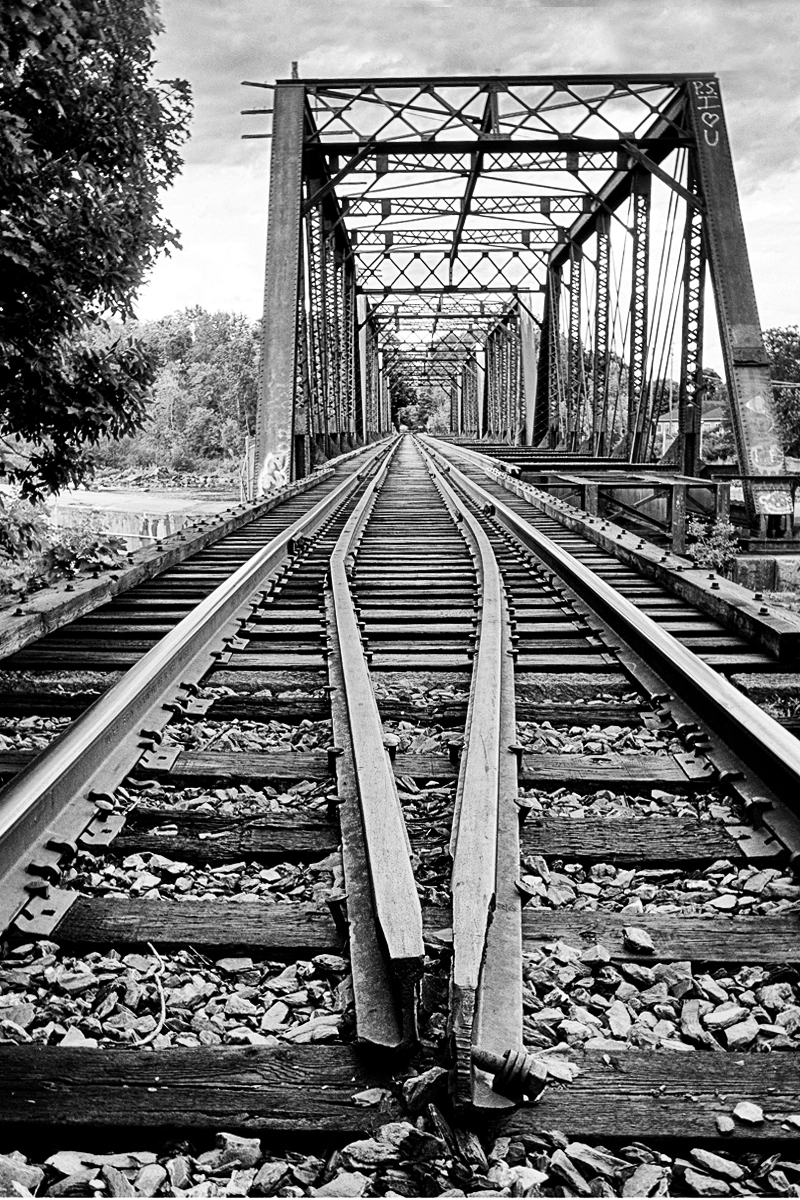
My only minor issue was that it made me tilt my head because neither the bridge nor the tracks were quite level. When I tried straightening just the bridge, the tracks looked like a train would derail right off them!
To fix it, I used the transform tool to distort the bridge so it sat level without messing up the tracks. It looks so much more natural and pleasing now. What do you think? Posted: 08/01/2026 15:36:01
Tom, as often as I have used the transform tool on images it never occurred to me to use it on this image. I had the same issue trying to level up the trestle.
I am in complete agreement with what you've done.
Thank you for the feedback!! Posted: 08/01/2026 23:30:18
I am in complete agreement with what you've done.
Thank you for the feedback!! Posted: 08/01/2026 23:30:18
Stephanie Phillips
I love the leading lines in this image, especially the curved tracks. It's good to see another fan of NIK in the group. I use it a lot. This is excellent as a B&W image. Tom's suggestion to use the Transform tool was right on target. Nice job. Posted: 08/03/2026 15:56:15
Stephanie, thank you! I appreciate your comments. Posted: 08/04/2026 01:54:11
I like black and white images on this theme of leading lines and a vanishing point. Tom has demonstrated some serious skills using the transform tool to gain alignment in post. Just a slight tilt in capturing the image and/or camera position a bit off, may throw the natural alignment you see off a bit. Sometimes the only way to get alignment is using a tripod. Nice image! Posted: 08/03/2026 16:57:59
Richard, I agree with you and thank you!! Posted: 08/04/2026 01:54:49
Such an interesting photo! That tilt of the bridge bothered me too! It was amazing what Tom accomplished! Where is that tool Tom? Loved it in black and white too! Posted: 08/19/2026 14:32:20
Jamie, thank you! I found the tool in Photoshop Elements Tom referred to under "Image> Transform" under transform I could have used "Skew" or "Distort" to accomplish the fix.
I imaging Photoshop has this function located under a similar menu. Posted: 08/19/2026 21:37:38
I imaging Photoshop has this function located under a similar menu. Posted: 08/19/2026 21:37:38
Donald, I remember traveling through Maine, on my way to Boston, when I lived in New Brunswick. Bangor used to be our first stop - such a beautiful town.
This is an interesting image with the leading lines and vanishing point. I think you can use a bit of Dehaze on the sky, as it is quite bright on the left hand side. Nice image overall. Posted: 08/25/2026 00:42:03
This is an interesting image with the leading lines and vanishing point. I think you can use a bit of Dehaze on the sky, as it is quite bright on the left hand side. Nice image overall. Posted: 08/25/2026 00:42:03