David Terao

August 2026 - Yellow Crowned Night Heron
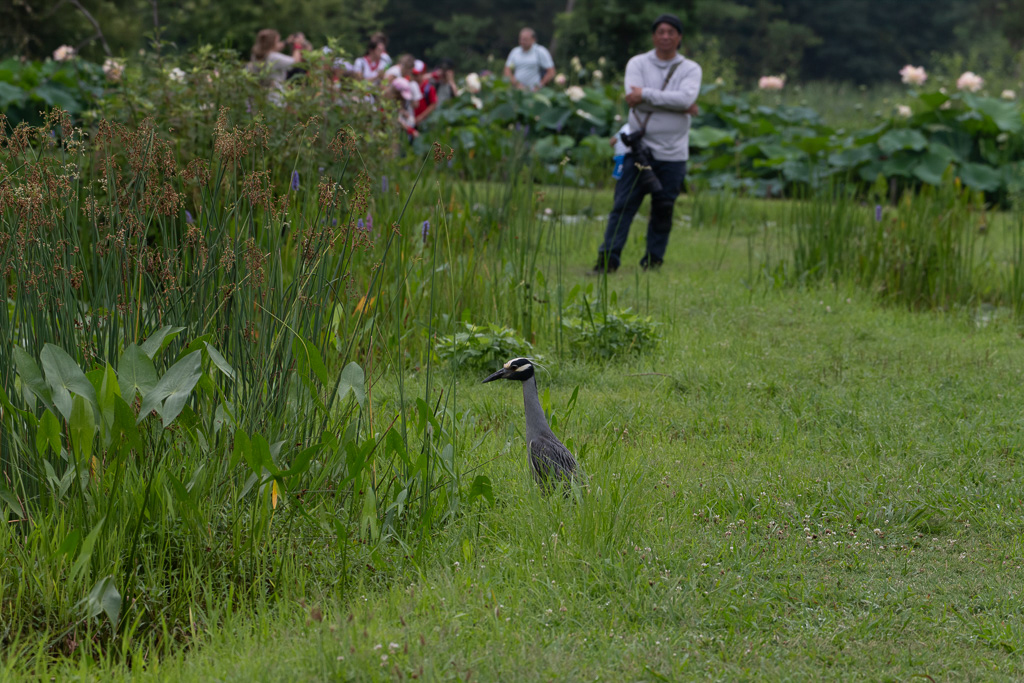
Original
About the Image(s)
This picture of a yellow crowned night heron was taken at Kenilworth Aquatic Gardens in Washington DC this month (July). It was peak season for water lilies and lotus flowers, and there were many people there looking at the flowers totally oblivious to the bird. Although the bird isn't doing much, it was a treat to see this bird in the day because, as the name suggests, it usually is active at night when it feeds. It stood absolutely still in that position for quite a long time. The image was heavily cropped and upsized in Topaz Gigapixel AI. Shot with a full-frame camera with a 70-180mm macro zoom (at 180mm) on a tripod. Exposure was 1/800 sec @ f/8.0 and ISO 800.
7 comments posted
You have achieved amazing clarity and focus for cropping in so much. I like your composition - the bird has room to look/move into and the tall weeds balance the bird in the frame. The background is nicely blurred which helps the bird stand out and gives the image dimension. I do see a little noise in the background that can easily be remedied. Posted: 08/09/2026 21:23:23
Thanks, Cindy. I didn't even notice the noise. You have much better eyes than me. Posted: 08/09/2026 22:16:59
Hi, David,
Looking at your original, it looks like at least one other photographer was "birdwatching", but you had the better view!
I finally got my first shot of a yellow-crested night heron this May. As you said, always elusive. Black-crowned version is much easier to find, at least along the South Carolina coast.
You did a good job of isolating him, and the clarity is particularly good given the lens and distance. Well-positioned crop, too. Kudos.
On my screen, the image is a bit dark. I don't see the noise that Cindy sees, but maybe it is the fact that it appears dark. Posted: 08/17/2026 01:06:17
Looking at your original, it looks like at least one other photographer was "birdwatching", but you had the better view!
I finally got my first shot of a yellow-crested night heron this May. As you said, always elusive. Black-crowned version is much easier to find, at least along the South Carolina coast.
You did a good job of isolating him, and the clarity is particularly good given the lens and distance. Well-positioned crop, too. Kudos.
On my screen, the image is a bit dark. I don't see the noise that Cindy sees, but maybe it is the fact that it appears dark. Posted: 08/17/2026 01:06:17
Thank you, Paul. I agree the image looks a little dark. I feel it needs more contrast. But, the gray bird and green surroundings are about the same tonal value. I tried brightening the whites while lowering the highlights to avoid blowing out the whites, but it only helped a bit. Not sure what else to try. Posted: 08/17/2026 12:00:40
David,
Not knowing how you processed it, I'm not sure. I think you might just need to lighten the green, which would make the bird more distinct. You can do that in LR or Camera RAW by going to the color sliders. Pick the green luminance and bring it up, possibly having to adjust the hue or saturation a bit.
If the bird needs brightening, I would mask (select subject and then subtract luminance range the highlights on the bird). Then you can adjust the gray and black parts of the bird without affecting the white part. Posted: 08/17/2026 18:31:08
Not knowing how you processed it, I'm not sure. I think you might just need to lighten the green, which would make the bird more distinct. You can do that in LR or Camera RAW by going to the color sliders. Pick the green luminance and bring it up, possibly having to adjust the hue or saturation a bit.
If the bird needs brightening, I would mask (select subject and then subtract luminance range the highlights on the bird). Then you can adjust the gray and black parts of the bird without affecting the white part. Posted: 08/17/2026 18:31:08
David,
Not knowing how you processed it, I'm not sure. I think you might just need to lighten the green, which would make the bird more distinct. You can do that in LR or Camera RAW by going to the color sliders. Pick the green luminance and bring it up, possibly having to adjust the hue or saturation a bit.
If the bird needs brightening, I would mask (select subject and then subtract luminance range the highlights on the bird). Then you can adjust the gray and black parts of the bird without affecting the white part. Posted: 08/17/2026 18:31:09
Not knowing how you processed it, I'm not sure. I think you might just need to lighten the green, which would make the bird more distinct. You can do that in LR or Camera RAW by going to the color sliders. Pick the green luminance and bring it up, possibly having to adjust the hue or saturation a bit.
If the bird needs brightening, I would mask (select subject and then subtract luminance range the highlights on the bird). Then you can adjust the gray and black parts of the bird without affecting the white part. Posted: 08/17/2026 18:31:09
David,
Not knowing how you processed it, I'm not sure. I think you might just need to lighten the green, which would make the bird more distinct. You can do that in LR or Camera RAW by going to the color sliders. Pick the green luminance and bring it up, possibly having to adjust the hue or saturation a bit.
If the bird needs brightening, I would mask (select subject and then subtract luminance range the highlights on the bird). Then you can adjust the gray and black parts of the bird without affecting the white part. Posted: 08/17/2026 18:31:20
Not knowing how you processed it, I'm not sure. I think you might just need to lighten the green, which would make the bird more distinct. You can do that in LR or Camera RAW by going to the color sliders. Pick the green luminance and bring it up, possibly having to adjust the hue or saturation a bit.
If the bird needs brightening, I would mask (select subject and then subtract luminance range the highlights on the bird). Then you can adjust the gray and black parts of the bird without affecting the white part. Posted: 08/17/2026 18:31:20