Manas Saha
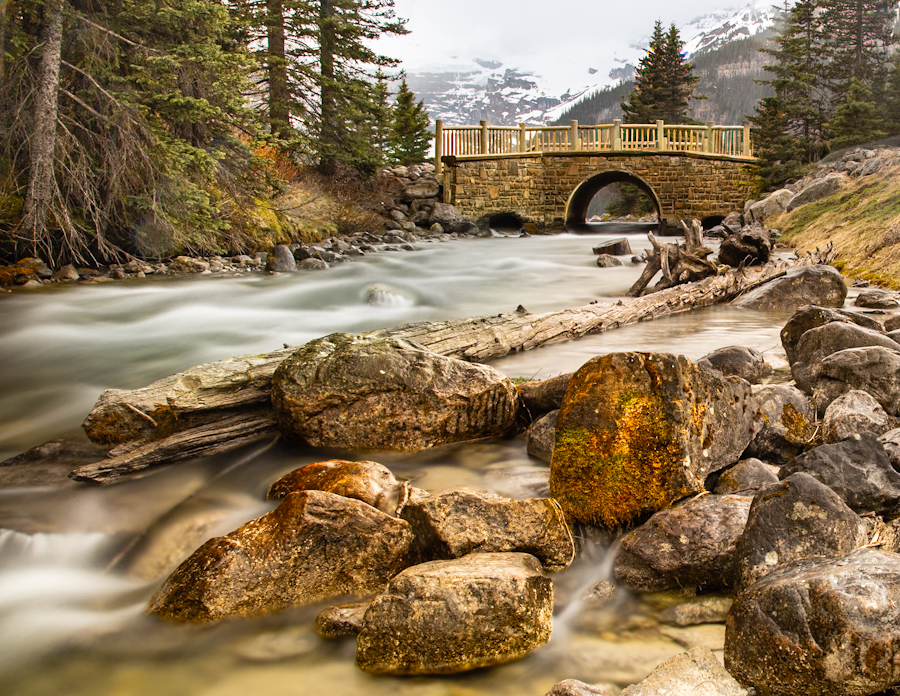
November 2026 - Tributary (Banf, CANADA- JUNE 8 2022)
About the Image(s)
It was a snowy cold early morning with soft transient golden light.
Technical Details - 24 mm, 15 s, f/11, ISO 50
Camera: Canon 5D EOS 5D MARKIII; Lens: EF 24 - 105 mm
3 comments posted
Good capture with a nice foreground, middle ground and background. Nice and sharp with good color. Unfortunately, the mountains and clouds in the background are blown out. Perhaps darking that whole are quite a bit might help. Posted: 11/18/2026 21:29:31
A serene landscape featuring excellent foreground interest and depth. The silky water draws the eye through the scene toward the charming bridge, creating a pleasing balance between motion and stillness. Posted: 11/18/2026 22:35:22
Nice composition with good leading lines a plenty with the tree trunk, the stream, its bank and the rocks A lot of good detail and I'm always jealous of people who can achieve the water effect. I tend to end up with just out of focus.
I'm with Howard on the mountains and clouds. Areas that are not blown out can be darkened. I have tried darkenin in Photoshop and since most of that area can be darkened it's not really blown out but it's always a problem trying to not end up with gray. I would try masking that area and turning down the highlights in Camera Raw, if you use PhotoShop. A tried selecting Color Range which can define an area for a light layer adjustment. By the way, the Color Range selection shows the white peaks in the water are just as bright as the snow and mountains.
It may take a combination things. Sometimes, if you have enough good space, you can copy parts that are the right brightness and clone away the bad spots
I think this photo is worth the effort to tone down that area--as I said lots of leading lines and interesting details so I would spend time on it. I think you can significantly improve this Good job Posted: 11/19/2026 21:56:00
I'm with Howard on the mountains and clouds. Areas that are not blown out can be darkened. I have tried darkenin in Photoshop and since most of that area can be darkened it's not really blown out but it's always a problem trying to not end up with gray. I would try masking that area and turning down the highlights in Camera Raw, if you use PhotoShop. A tried selecting Color Range which can define an area for a light layer adjustment. By the way, the Color Range selection shows the white peaks in the water are just as bright as the snow and mountains.
It may take a combination things. Sometimes, if you have enough good space, you can copy parts that are the right brightness and clone away the bad spots
I think this photo is worth the effort to tone down that area--as I said lots of leading lines and interesting details so I would spend time on it. I think you can significantly improve this Good job Posted: 11/19/2026 21:56:00