Bob Legg

November 2026 - “Wireworks Enhancement"
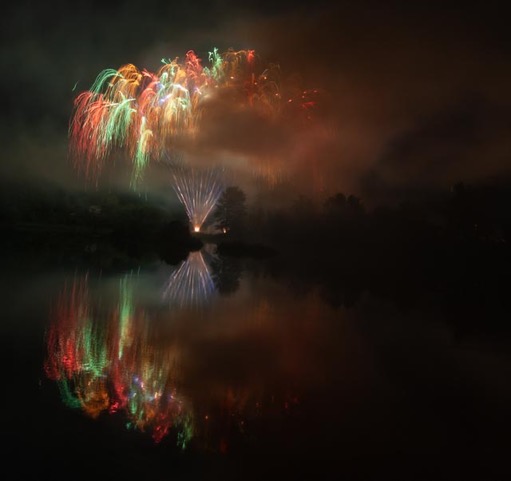
Original
About the Image(s)
Original fireworks taken @ISO 200, f9.0, 12mm and 4.5 sec exposure. Because of smoke I used PS Extrusion filter to give the extending branches of the fireworks a more pronounced and colorful appearance and have them extend wider than the original and incorporate reflections from the water.
7 comments posted
It's an eye-catching photo for sure, Bob! Amazing what you can do in post-processing when you know what you're doing. Reminds me of stained glass with a texture. Thanks for introducing something new - to me, anyway!
Posted: 11/11/2026 01:20:36
Posted: 11/11/2026 01:20:36
It's an eye-catching photo for sure, Bob! Amazing what you can do in post-processing when you know what you're doing. Reminds me of stained glass with a texture. Thanks for introducing something new - to me, anyway!
Posted: 11/11/2026 01:20:46
Posted: 11/11/2026 01:20:46
Bob, a very artistic rendition of your fireworks photo.
Love the bold, vibrant colours.
I was wondering about the black line and mirror image right in the middle horizontal.... what would it look like if you do the sharpest area in the right top corner and the black line diagonal from bottom left to top right?
For me the photo is so artistic why do you want to follow a. horizontal in the middle?
Great post processing and very creative and artistic, Well done Posted: 11/11/2026 04:54:45
Love the bold, vibrant colours.
I was wondering about the black line and mirror image right in the middle horizontal.... what would it look like if you do the sharpest area in the right top corner and the black line diagonal from bottom left to top right?
For me the photo is so artistic why do you want to follow a. horizontal in the middle?
Great post processing and very creative and artistic, Well done Posted: 11/11/2026 04:54:45
I love the bright colors !! You really did create an eye-catching abstract. Can you tell me what is an Extrusion filter?
I haven't heard of that. It's in Photoshop? I'd love to learn more. Posted: 11/11/2026 19:52:13
I haven't heard of that. It's in Photoshop? I'd love to learn more. Posted: 11/11/2026 19:52:13
Thanks Donna. First you confirm your image is open-8 bit-mode and filter , Stylize, extrusion. You then chose between blocks or trapezoids and chose the size of the blocks or traps (triangles). Don't bother if you have old tired computer. It depends on the size of the details in the image and what you are trying to create. Its trial and error. Good luck. Posted: 11/11/2026 21:43:04
I love the vibrant colors & the idea behind this. However, what spoils it for me are the areas without detail on the right side, upper & lower. Is there some PS magic to fill these in? I tried Generative Fill, but the lack of mirror image was too obvious. Posted: 11/17/2026 01:46:19
I have not tried Generative fill on something like this. Doug, I have this idea. Have you tried a prompt describing area you want to copy from and paste in. I'm pressed for Time at this moment. Firefly is pretty smart as witnessed by asking it to make more or bigger rain drops and then telling it to reduce that answer. If I get an opportunity I'll let you know.
Bob Posted: 11/17/2026 02:34:08
Bob Posted: 11/17/2026 02:34:08