Mark Burgess
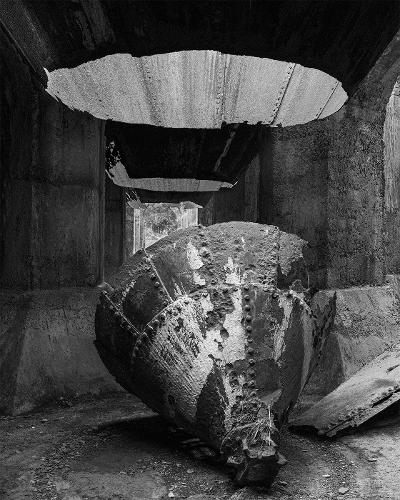
April 2026 - Gold Working
About the Image(s)
Here is my April image. These days I do most of my editing in ACR and sometimes nothing further in Photoshop. This means I cannot produce a before image....well I don't know how to temporarily turn off all the edits, send to PS, make an Original file then restore the changes. Maybe there is away but this is why I struggle to produce an original file
Last weekend I attended a Black and White Workshop and here is an image from this. The location was old gold working ruins and these in particular were the remains of old cyanide tanks used to extract gold.
11 comments posted
Mark, if possible, consider creating a duplicate of your original capture before beginning any processing and use that untouched copy as the basis for your edits. Working from a processed JPEG-especially one that has already been resized or compressed-can limit your ability to evaluate micro?contrast, edge acuity, and fine surface texture. At the current resolution, it's difficult to assess the subtle tonal transitions and detail within the subject's structure.
That said, the form and lighting of your subject are well?suited to a black?and?white treatment, particularly if you can start from a higher?bit?depth source file where tonal adjustments won't compromise detail retention.
Posted: 04/02/2026 16:38:52
That said, the form and lighting of your subject are well?suited to a black?and?white treatment, particularly if you can start from a higher?bit?depth source file where tonal adjustments won't compromise detail retention.
Posted: 04/02/2026 16:38:52
Hi Richard, thanks but I process from the raw files in ACR then into PS as 16 bit. But for here we have to make a JPG sized to 1400 pix so agree not much to go on. May be PSA could lift the file size Pete? 3820 is pretty common these days. Posted: 04/02/2026 19:45:34
Mark, the old gold mining ruins are fascinating. It's fun to imagine the era when these items were in use. I took a stab at playing with your image to further highlight the two main items. Like you, I use ACR for the vast majority of my edits. Your thoughts?
If you use Bridge to obtain your initial images, you can access the original even though edits have been made. To do this, FIRST save your edited image (in Photoshop). Then go into Bridge and right-click on the image. This will produce a fairly long menu. About 2/3rds of the way down, there is an item called Develop Settings. Hovering over this will give a short menu, the last item being Clear Settings, which will return your image back to its original version. (Sorry if this is confusing!)
Posted: 04/02/2026 17:08:03
If you use Bridge to obtain your initial images, you can access the original even though edits have been made. To do this, FIRST save your edited image (in Photoshop). Then go into Bridge and right-click on the image. This will produce a fairly long menu. About 2/3rds of the way down, there is an item called Develop Settings. Hovering over this will give a short menu, the last item being Clear Settings, which will return your image back to its original version. (Sorry if this is confusing!)
Posted: 04/02/2026 17:08:03
Thanks Pete. That is helpful! Posted: 04/09/2026 04:37:23
I read recently about how to save files in ACR as a jpeg (without sending it to PS first). I just gave it a go and it seems to work. I'm interested whether anyone else has tried it. In ACR, go to the 'convert and save image' symbol. It's next to the settings wheel. In here, you can set the image format to jpeg and limit the size to 1mb (without having to resize the image in PS). It then creates a new file. Hope that makes sense! Posted: 04/03/2026 01:35:18
Thanks Suzanne. That would work if you could turn off the edits and export the jpg. I will try it. Posted: 04/09/2026 04:36:42
Thank you, Suzanne. I didn't know that. It will be useful. Posted: 04/09/2026 15:19:29
For Mark's image, I really like the texture in the stone and the mining equipment. I'd bring that out even more. Perhaps a lower viewpoint would have blocked out the window in the distance. I wonder what a colour version would look like? There's probably rust and discolouration that is lost in the B&W. The lighting is nice and does bring out that texture. Posted: 04/03/2026 01:39:26
Thanks Suzanne Yes good call on the POV. That would be better Posted: 04/03/2026 04:19:18
Mark, hi! This is a great black-and-white photograph. Post-industrial landscapes have their own distinctive beauty :-) Posted: 04/17/2026 07:30:15
Thanks Natalia Posted: 04/17/2026 09:58:37